Thursday, July 7, 2011

“Download map area” added to Labs in Google Maps for Android

This is an awesome feature when you have an extremely unreliable cell provider like U.S. Cellular!

“Download map area” added to Labs in Google Maps for Android: "(Cross-posted from the Mobile and Lat Long Blogs)


One way we bring you new product features is through Google Labs—a collection of fun, experimental features you can turn on if you’re interested in the functionality. In fact, Google Maps itself started as a lab. In addition to our desktop Maps Labs, Google Maps for Android has a few tricks you can try out right from your phone. We’d like to introduce you to one new experimental feature, “Download map area,' but also remind you of two other ones we already have: “Scale bar” and “Measure.”


Download map area

When you’re visiting an unfamiliar location, Google Maps for mobile is great for getting an idea of how close you are to your destination, where streets and landmarks are in relation to each other, or just for getting “un-lost.” But what if you don’t have a data signal, or you’re abroad and don’t have a data plan? We say that if you use Google Maps for mobile, you’ll never need to carry a paper map again. The “Download map area” lab in Google Maps 5.7 for Android is a step in making that statement true even when you’re offline.


Let’s say later you’re visiting Bordeaux during a trip to France. If you were to open Google Maps for mobile and zoom into Bordeaux without data coverage or wifi, you’d see the image on the left:
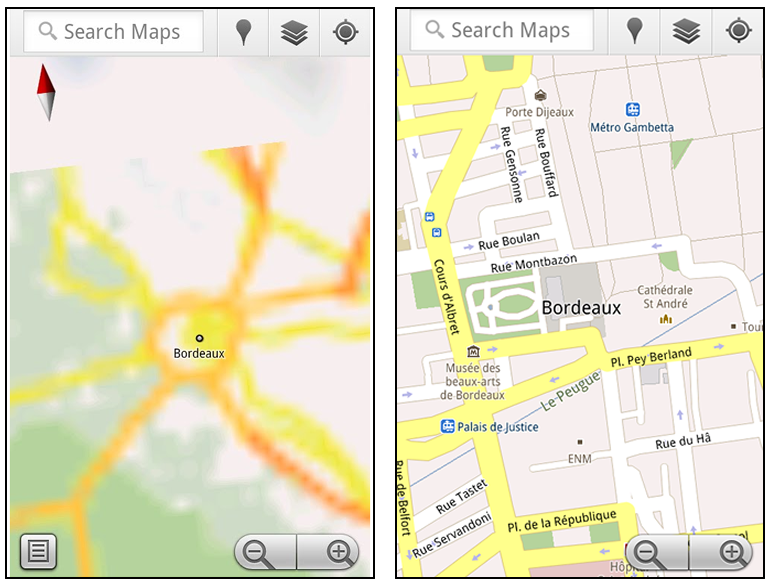


Left: Bordeaux with no data or wifi. Right: Bordeaux with downloaded map area


That’s not particularly useful when you’re trying to find out how close you are to the Cathedrale St. Andre. But a little advance planning and “Download map area” can help. Before you take your trip, while you still have access to WiFi or data coverage, you can open up any Places page in the world, click “More” to get the Place page menu, and download Google’s maps for a 10-mile radius.
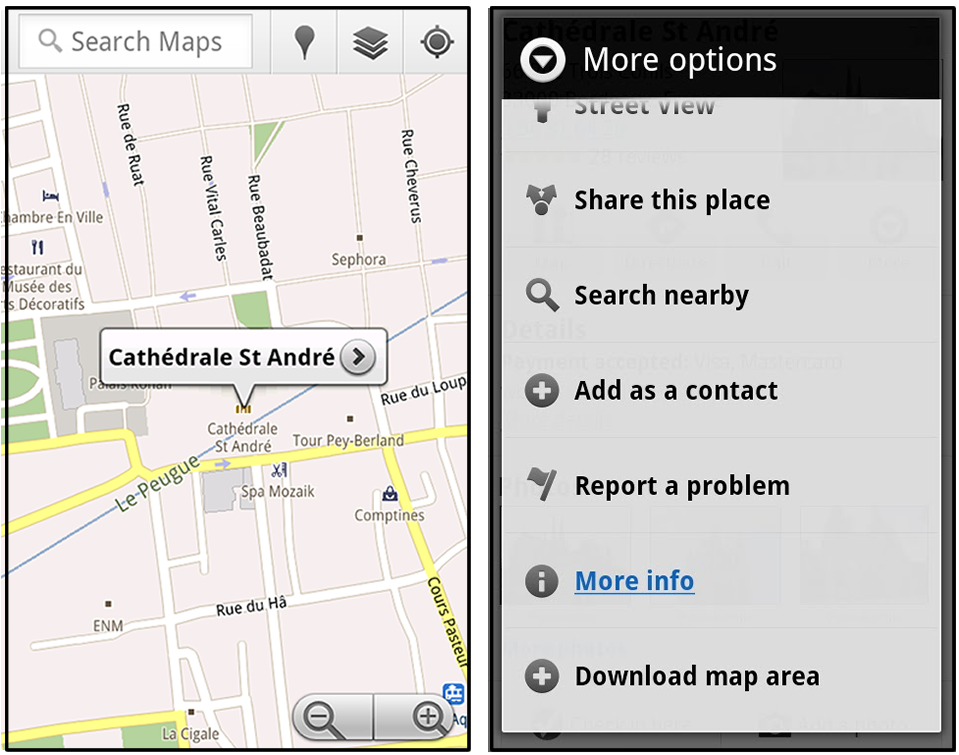


Left: Tap a landmark to enter its Place page. Right: Place page “more options” menu


The download can take as little as a minute or two. This download stores only the base map tiles and the landmarks on the map, so you still need a data connection to see satellite view and 3D buildings, search for Places and get directions. But we hope the level of detail available will help you find your way!


Left: Status screen for download. Right: Coverage of downloaded map area


All your downloaded map areas can be managed in your Google Maps cache settings so you can delete maps you no longer need or if you want to free up storage. After 30 days, all downloaded map areas will be removed from your cache; they can be re-downloaded any time.


Scale bar

Google Maps has approximately 20 different zoom levels that range from a 2,000 mile scale to a 20 foot scale. With finger gestures making it really quick and easy to zoom in and out, sometimes it’s not always clear what zoom level you’re at. What might be just a few streets away can be quite a long walk depending on the scale. To help with this, you can turn on a scale bar, which updates based on your zoom level.


Scale bar in the lower left


Measure

If you ever need to know the distance between San Francisco and New York (about 2602 miles) or between any other two points on the map, the “Measure” lab can help you out. Once it’s enabled, you’ll notice a tape measure icon just above the zoom buttons. After clicking that icon, you’ll be prompted to tap two points on the map and Google Maps will calculate the straight distance between those points (this direct distance is “as the crow flies”).
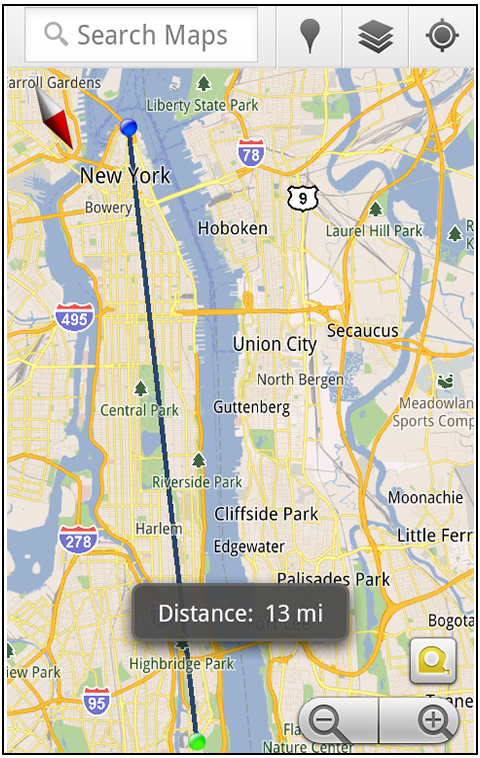


Example of the “Measure” Labs feature


To access Labs on your phone, press your phone’s menu button once in Google Maps, choose “More” and select Labs. On a tablet, click the menu button in the upper-right corner of Maps. The “Download map area” lab requires Android 2.1+ and the latest version of Google Maps. We look forward to bringing you more experimental features soon and hope you enjoy trying out Labs in Google Maps for Android.


Posted by Chikai Ohazama, Director of Product Management, Google Maps for mobile


"

Wednesday, July 6, 2011

The Connected States of America [INFOGRAPHIC]

This is a great collection of information. Applying pragmatic means to define the states is a great concept.

The Connected States of America [INFOGRAPHIC]: "


Your community used to be defined geographically: the group of people around your block, your subdivision, your small town. But as these infographics show, community now extends as far as your cellphone can call — and has created some interesting new conglomerations of states in the US.

The Connected States of America is a series of illustrations based on mobile penetration, SMS and call communications. For example, it tells us that New Englanders like to call each other a great deal, whereas Californians can easily be divided into two or three mobile communities.

There’s a pretty nifty interactive map and a video illustrating the findings. All of the maps and visuals are based on research done by the MIT Sensible Lab, AT&T and IBM, aggregated from July 2010.

Take a look through the gallery and let us know if you agree. What does mobile data say about your community?


The Connected States of America


Cities are at the heart of communication communities. Businesses, friends and families connect between the largest population centers. Likewise, mobile usage density reflects population density.

In this graphic, the top layer represents communities formed by calls and SMS records. The middle part represents calls between counties, with the height of the link representing connection volume. At bottom is a map of population density per square mile.


Call Data Community Map


Phone call trends divide the states of California and New Jersey, as communications revolve around the states' major cities. Some neighboring states are conjoined by mobile traffic: the two Carolinas; Oregon and Washington. State borders are obsolete in New England. Michigan and Texas are the rare examples where mobile communications accurately reflect state lines.


SMS Data Community Map


In some cases, different call and SMS communities exist. Mississippians tend to call Louisianans more on the phone, but are more likely to text Alabamans. California's SMS traffic divides the state in three, rather than the two communities formed by phone calls.


Interactive Map


The project also released an interactive map, allowing readers to see how their counties connect with the rest of the country. The more red, the higher the number of mobile connections that go there from your county.

More About: cellphones, connected states of america, infographic, Mobile 2.0, SMS, social good, texting

For more Mobile coverage:


"

Delivery Notification

I have done this before! Minus all of the wizardry references...

Delivery Notification: "You can arrange a pickup of your sword in Rivendell between the hours of noon and 7:00 PM."

Tuesday, July 5, 2011

Obama dead, according to Fox News

There was no hacker, Glen Beck and Bill O'Reilly got krunk and went crazy tweeting about there fantasies.

Obama dead, according to Fox News: "


Hackers have taken over a Twitter account belonging to US broadcaster Fox News and declared President Obama dead. The @foxnewspolitics feed stated: “BREAKING NEWS: @BarackObama assassinated, 2 gunshot wounds have proved too much.”


More than two hours after the malicious postings appeared, they had still not been removed.


A group or individual, calling themselves The Script Kiddies appeared to claim responsibility. Fox News said it was investigating the posts. The bizarre messages began appearing around 07.00 BST on July 4.


The first read: “Just regained full access to our Twitter and email. Happy 4th.” The next posting stated: “@BarackObama has just passed. The President is dead.”


Fox News Politics is one of the Twitter accounts associated with the industry-leading cable news network.Its Twitter account carries the “verified” tick icon, indicating that the feed belongs to the organisation it claims to be.


In a statement, Jeff Misenti, vice president and general manager of Fox News Digital said: “We will be requesting a detailed investigation from Twitter about how this occurred, and measures to prevent future unauthorized access into FoxNews.com accounts.”


Full Story at BBC News

"

Friday, July 1, 2011

Why yo momma won’t use Google+ (and why that thrills me to no end)

Reading the post really excited me about what google+ could be. Where I live there is a square with a Starbucks and a bookstore and many other stores. This place is great except for the fact that you are always surrounded by teenagers or rednecks. Close to this square is a place called heritage village, what used to be a welcome center has been reclaimed and turned into a bakery and espresso bar. Built around this welcome center are several stores, including a beer and wine shop and a cigar company. For the most part this place is lightly inhabited, the people you meet here will be musicians or artists or long time members of the community. My hope is that Google+ will be something like heritage Village. A place for link minded people with nowhere to go.

Why yo momma won’t use Google+ (and why that thrills me to no end): "

OK, I’ve been putting many hours into Google+. In just the few days that it’s been released I’ve followed 2,723 people, written many dozens of posts there, and have thoroughly used the product. I’ve also tried to get some normal users into the product, starting with my wife (we argued for 45 minutes about it) and I’ve come to some conclusions. Here’s the biggie:


Your mom won’t use Google+.


How can I state that so clearly? Easy. Most “average users” are locked into Facebook and aren’t willing to consider a new social tool until they hear about it from their friends. Since most of the people who are on Google+ so far are geeks, insiders, social media stars, journalists, and other people (Google admitted tonight they are only accepting people who have strong social graphs so that they can both make sure everyone has a good first experience as well as test out some of the technology before opening it up to a wider audience) the chances normal people (metaphorically speaking, your mom) won’t hear about Google+ from normal users for quite a while.


By then I’m sure Facebook will react (ie, copy) Google+’s best features (Facebook already has called a press conference for next week where they are going to announce something “awesome”). This will mean that normal users, who aren’t really going to get involved at this point in Google+’s life, won’t feel the need to switch.


So, what is Google+ for then?


It’s for us!


Come on now, we geeks and early adopters and social media gurus need a place to talk free of folks who think Justin Bieber is the second coming of Christ. That’s what we have in Google+ right now. Do we really want to mess that up?


Plus, let’s just be honest here. There are pieces of Google+ that are mighty geeky.


Let’s start with how to bold and italicize text. Do you have a pretty editing window like, say, exists on Quora? No way.


To bold text you surround that text with asterisks. *Like this* GEEKY ALERT! Italicize? Put underscores around the text. Strikeout? Put hyphens around it.


And that’s just the little thing. Let’s talk about the big thing. Circles. Now, heavy and passionate users of social media, like myself, really love things like lists and groups. Why? Because we want to spend hundreds of hours making sure our social graphs are really organized.


Normal people do NOT do this. They just want to friend their 20 real-life friends and 30 family folks and be done with it. Average/normal users want the system just to bring them fun stuff without doing any work.


See, if you put the average Silicon Valley geek in front of a TV and tell him to sit on the couch and watch TV for four hours they won’t know what to do. They will start building databases of their favorite shows, start figuring out how to optimize their DVRs so they can fast-forward through commercials faster, and stuff like that.


Normal/average users? They just want to watch TV and drink beer.


So, you getting where I’m going with this? Google+ is for the passionate users of tech. If you just want to sit back and have the system do all the work (which means it’s not perfect, but it’s good enough for most people) then Facebook is gonna be where you stay, especially since your friends are gonna lock you in for quite some time. But if you want to really be able to choose who you listen to, then Google+ is much better.


Oh, and that’s not even considering the new “Hangout” videochat feature. Damn that thing is cool. You can have 10 people call into a room and it lets you all talk to each other. I haven’t used Skype since that shipped.


Anyway, it’s clear Google has turned a corner. They have now proven to everyone that they can do social and get on the playing field.


But they haven’t yet proven that they can convince your mom to use it and that’s just fine with me.


That all is a long way of saying that I really love Google+ and I don’t care what the average user thinks of it. I’m getting a ton of utility out of it and I am having a blast with it. Hope to see you there soon, but please leave yo momma over on Facebook, OK?

"

A preview of Gmail’s new look

I love the new look google is adopting with their products. It is very clean and I like the use of bold colors. I also like the black bar on top.

A preview of Gmail’s new look: "Posted by Jason Cornwell, User Experience Designer


We get a lot of great feedback about how Gmail helps you be more efficient, keep in touch with family and friends, and get work done. We’ve saved you from forgetting attachments and made sure that you got the right Bob. Over the years, adding countless features to Gmail has made it an increasingly powerful communication hub, but along the way the interface has also become more cluttered and complex.


That’s one of the reasons we’re embarking on a series of interface updates to help strip out unnecessary clutter and make Gmail as beautiful as it is powerful. This is part of a Google-wide effort to bring you an experience that’s more focused, elastic, and effortless across all of our products. The changes are not going to happen all at once. We know that you love and care about Gmail as much as we do, and we’ll be working on these upgrades gradually over the next few months to allow plenty of time to understand and incorporate your feedback into the evolving design.


We’re kicking things off with two new themes for you to try out as a sort of sneak peek at what we’re up to. Starting today, you’ll see the “Preview” and “Preview (Dense)” themes in the Themes tab in Gmail Settings. Why two themes? Our new interface will eventually expand dynamically to accommodate different screen sizes and user preferences, but until then you can pick the information density that you prefer.


Here’s what one of the new themes currently looks like:


And in conversation view:


Click the images above to see larger versions.


If you poke around you’ll hopefully find a lot to like and a much cleaner, modern look but also few rough edges. In particular, some Labs features may look a little strange in the new themes. We plan to fix these issues as we roll out changes in the coming months. You can also expect some updated themes that embody the same design principles but are better suited to working in a dark environment, use a different color palette, or include the illustrations that we know many of you love to see around your inbox.


Look out for these and other new features over the next few months. In the meantime, try out the new themes as a preview of the future of Gmail and let us know what you think.


P.S. Like Gmail, Google Calendar is also getting a new look. You’ll see it automatically within the next few days so there’s no need to turn it on, and we’ll also continue to make improvements there in the coming months. Details about the current changes to Calendar can be found in the Calendar help center.


"

Wednesday, June 29, 2011

Why Google+ Might Be Doomed From the Start

This blog was written buy a guy I know from twitter, EAv, and the android community. I share his concerns and really hope he is wrong. I can understand the first wave of invites being relatively small to make sure everything works at speed, but it is essential that those who WANT to use the service are able to, and SOON.

Why Google+ Might Be Doomed From the Start: "

Before I say anything, I want to go on record saying that Google+ looks amazing, and I seriously hope that it takes off and doesn’t go the way of Google Wave. However, Google’s VIP only approach for the initial release of Google+ might doom it just like it doomed Wave.


While I understand the need for beta periods, keeping them private is not something you can do with a social network. The loss of hype is what killed Wave, and Wave lost hype because it was in a invite-only stage for so very long (probably because Google announced it at Google I/O and then stopped caring, but that’s beside the point). When you announce a product, people will want to try it out immediately. If they don’t get a chance to get their hands on it, odds are they will walk away, never to return.


Once again, I really hope Google+ does well, and I can’t wait for a chance to try it out. I simply believe that private betas just don’t work for social networks.